In Depth
Project Details
A deeper look at each artifact — the context, design rationale, theoretical grounding, and measurable impact behind the work.
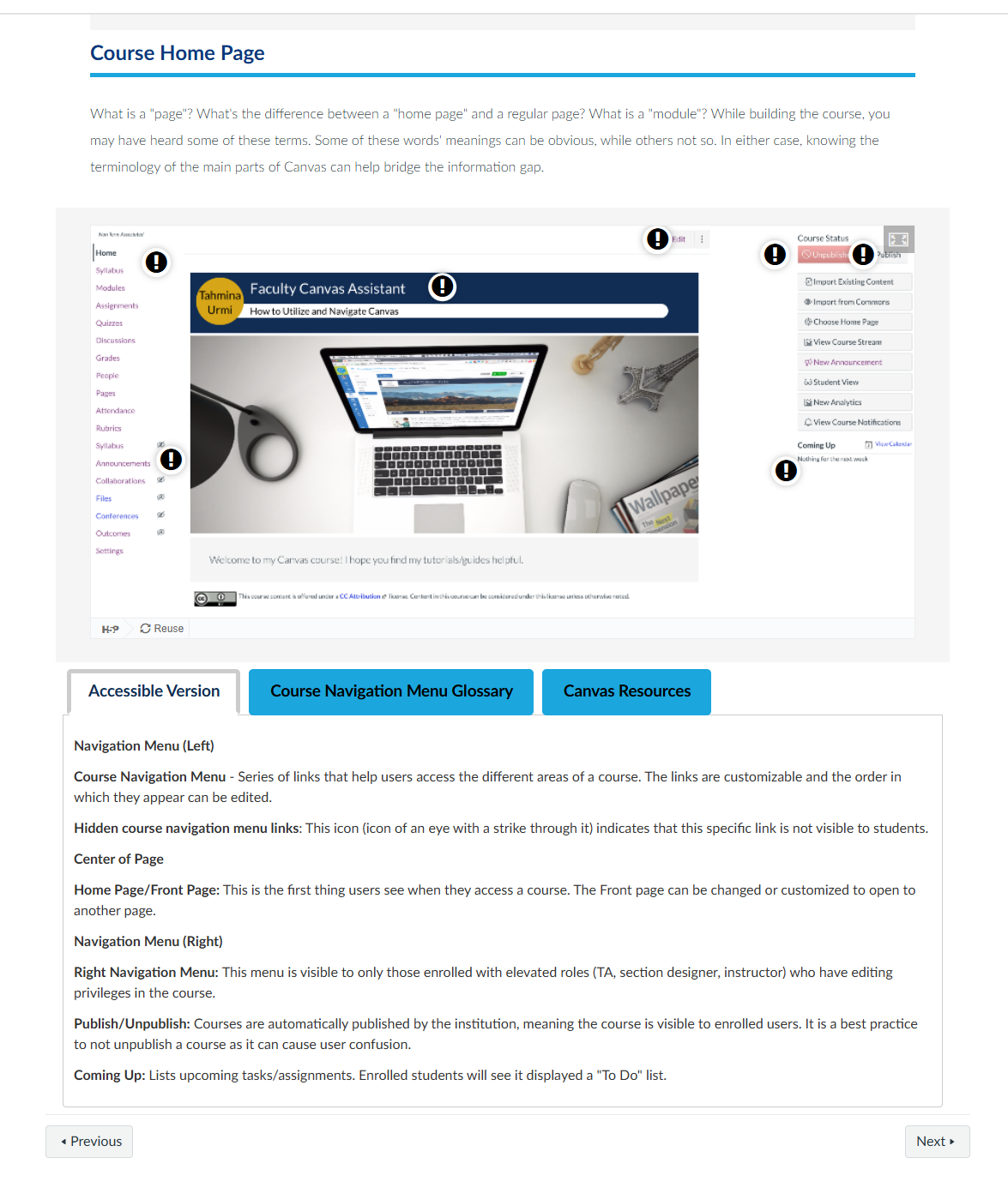
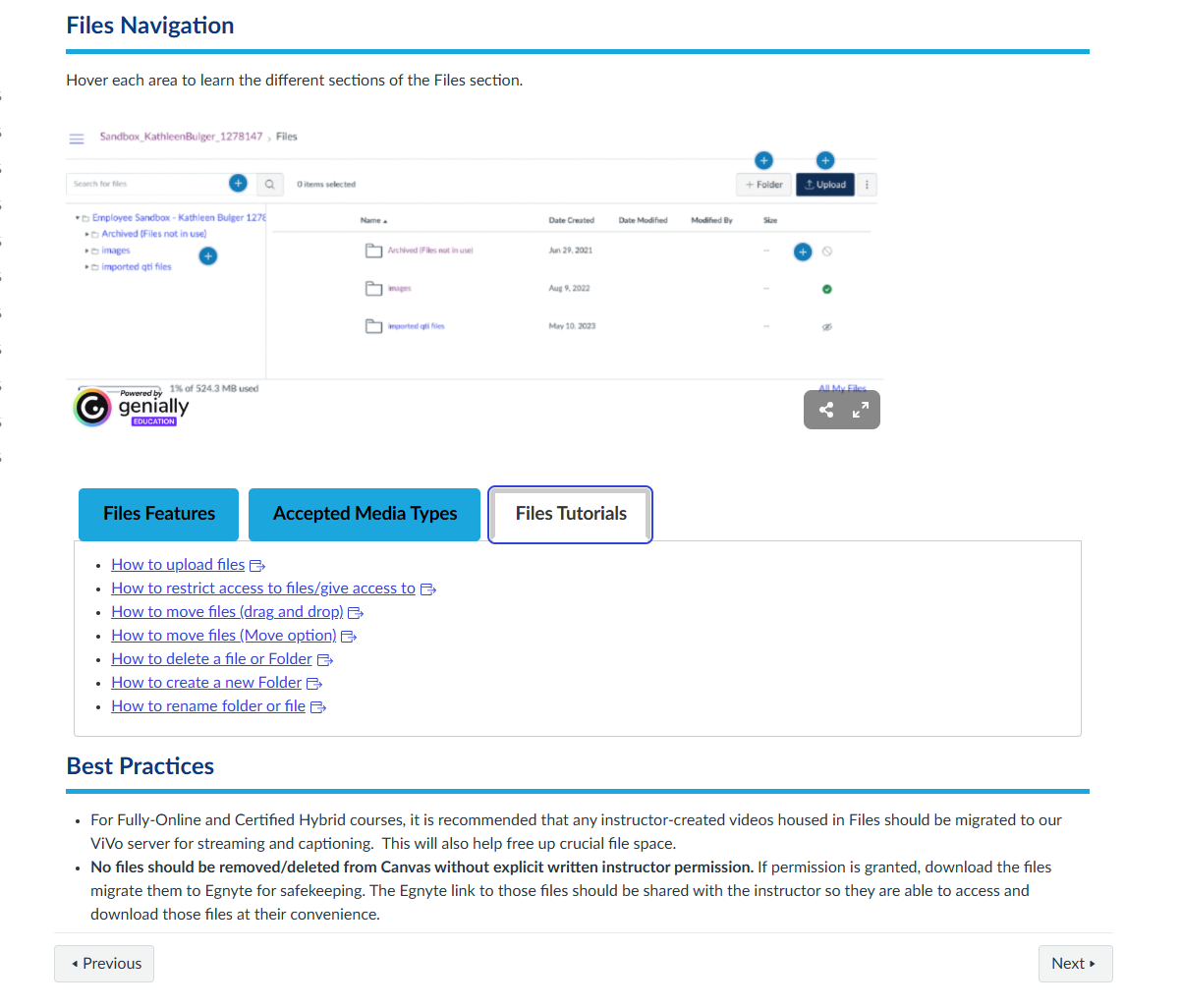
Faculty Canvas Training
Designed a crash-course for faculty members, addressing a documented gap in platform confidence identified through meetings and emails. Modules and pages focused on areas where faculty most frequently sought one-on-one support.
Each page focused on one subject at a time
Design Rationale
The decision to build this repository for the faculty I work with, I identifed where faculty felt least confident and built the "course" around those specific pain points. This ensured every minute of facilitation time addressed a genuine, self-identified need — increasing both relevance and engagement. I structured each activity around a task faculty would actually perform in their own courses, so learning transferred directly to real work rather than remaining abstract.
Theory & Pedagogy
This design draws directly on Knowles' principles of andragogy: adult learners are most motivated when training is immediately applicable to their professional context and addresses self-identified needs. By anchoring sessions to faculty-reported pain points, I honored the andragogical principle that adults bring experience to learning and respond best when that experience is respected and built upon. The ADDIE framework guided the full development cycle — from the needs analysis survey (Analysis) through iterative session revisions after each cohort (Evaluation).
Impact
Faculty who accessed the course reported significantly increased confidence using Canvas tools. Support tickets and emails related to Canvas decreased.
New Hire Onboarding Course
Developed a comprehensive asynchronous training course for the new hires, covering onboarding workflows, departmental processes, and tool-specific best practices. The course was intentionally designed to scale — built once to serve multiple cohorts without requiring live facilitation each cycle, reducing the instructional burden on supervisors and ensuring consistent onboarding quality.
Design Rationale
A key design decision was organizing the course around real workflows rather than policy documents. Rather than presenting information as a list of rules, I mapped the course structure to the sequence of tasks a new team member would actually encounter in their first weeks — making the learning immediately actionable. Knowledge checks were embedded at each workflow milestone rather than consolidated at the end, allowing learners to self-assess understanding before moving forward.
Theory & Pedagogy
The course structure reflects Bloom's Taxonomy: early modules focus on foundational knowledge and comprehension, while later modules require application through scenario-based activities. This scaffolded progression ensures learners build competence at each cognitive level before advancing. The self-paced, asynchronous format aligns with Knowles' andragogical principle of learner autonomy — new team members can move at their own pace and revisit content as needed.
Impact
The course reduced average onboarding time from [X days/weeks] to [Y days/weeks], freeing supervisor capacity previously spent on repetitive orientations. New team members consistently reported feeling well-prepared for their first assignments, with [X]% completing the course and passing all embedded knowledge checks on first attempt.
Screenshot or slide preview — add image here
Portfolio Case Study: HTML/CSS Workshop Series (Part 1)
An introductory hands-on workshop teaching HTML fundamentals to attendees with all levels of coding experience. Participants learned to read, write, and edit basic HTML within Canvas course pages — expanding their capacity to build richer, more accessible learning environments without relying on technical support.
Format: Synchronous Hands-on Technical Workshop
Core Focus: Introduction to semantic HTML, web accessibility, and fixing corrupted code structures within the Canvas LMS Rich Text Editor.
Design Rationale: The Context & Challenge
While modern Learning Management Systems like Canvas feature robust Rich Text Editors (RTE), the generated backend code can easily become bloated, broken, or inaccessible during rapid course development. Instructional designers and academic technologists frequently encounter formatting bugs or layout limitations that cannot be resolved through the visual interface alone.
To address this gap and increase overall team productivity, I collaborated with two colleagues to design a foundational workshop to demystify front-end web markup. As Creative Director for this initiative, my goal was to ensure the curriculum directly connected raw code to polished design standards, providing the team with the troubleshooting skills to repair broken pages efficiently and maintain visual consistency across university courses.
Introducing code to non-technical learners requires careful attention to cognitive load. We sequenced the workshop by starting with reading and identifying HTML (lower cognitive demand) before asking participants to write and modify it. Every example used a real Canvas scenario — a page they might actually build for their own course — so the learning felt immediately relevant rather than abstract. A printed quick-reference cheat sheet was distributed so learners weren't forced to memorize syntax on the spot.
Theory & Pedagogy: Scaffolding the Technical Curriculum
Designing a technical workshop for a diverse audience—ranging from entry-level designers to department managers and IT specialists—requires careful pedagogical scaffolding. Working as one of three facilitators, we balanced the technical instruction while I guided the overall user experience of the training materials.
---Conceptual Anchoring: The workshop opened with a brief history of HTML to clarify the purpose of web standards and semantic tags (< h1 >, < p >, < ul >). This baseline setup ensured that all attendees, regardless of technical background, understood that HTML is the structural skeleton of content.
---Active Learning & Immediate Application: Rather than relying on passive lecture delivery, our facilitation team transitioned directly into live, code-along exercises. Attendees learned how to interpret raw tags and recognize syntax errors that commonly break Canvas page responsiveness.
---The Authentic Assessment: At the conclusion of the workshop, we challenged attendees to complete a practical, quick assignment: they were given a fragment of corrupted, broken HTML code. The objective was to diagnose the syntax errors, apply clean structural tags, and successfully render it as a standard, visually balanced Canvas page.
Workshop design drew on constructivist learning theory — learners built understanding by doing, not by watching. Each concept was introduced through a brief explanation, immediately followed by a hands-on activity where participants modified real code in a sandbox environment. This mirrors the constructivist principle that knowledge is constructed through active experience. Bloom's Taxonomy guided the activity sequence: remember → understand → apply, with the final activity requiring participants to build a short page section from scratch (application level).
Rationale & Measurable Impact
Promoting Inclusive Design & WCAG Alignment: A significant focus of this foundational session was connecting HTML directly to digital accessibility. Attendees practiced organizing proper heading hierarchies (h1 through h4), ensuring that screen readers can logically navigate course pages. This directly aligns with universal design practices and quality assurance standards.
Team Empowerment & Shared Expertise: By working through an authentic troubleshooting project, instructional designers gained a deeper command over the Canvas backend. Collaborative facilitation allowed us to support different learning paces in the room effectively. The team walked away with an immediate capability to fix common formatting bugs independently, reducing overall development friction.
Demand for a
follow-up intermediate workshop (HTML Workshop 2) was driven
entirely by participant requests, demonstrating the session's
success in building genuine interest and confidence.
Screenshot or slide preview — add image here
Portfolio Case Study: HTML/CSS Workshop Series (Part 2)
An intermediate follow-up workshop building on HTML Workshop 1, covering advanced layout techniques, accessibility markup (WCAG 2.1), and Canvas-specific HTML customizations. This workshop was created in response to participant requests following Workshop 1.
Format: Synchronous Hands-on Technical Workshop
Core Focus: Combining HTML with basic Cascading Style Sheets (CSS), manipulating layout divisions (< div >), and building custom UI components in Canvas.
Design Rationale: The Context & Challenge
Once a design team masters the basic structure of HTML, the next bottleneck in online course development is visual communication and aesthetic consistency. Standard Canvas elements can sometimes look monotonous, prompting designers to seek ways to elevate the visual experience to drive student engagement.
Because Workshop 2 built directly on prior knowledge,
we designed it with a "connect and extend" structure — each
new concept was explicitly linked back to something participants
already knew from Workshop 1. Accessibility was not treated as
a separate module but woven throughout: every layout technique
introduced was immediately paired with its accessibility
implication, reinforcing that inclusive design is not a
checkbox but an integrated practice.
This second workshop was designed to teach the team how to safely implement custom CSS inline styles and layout divisions. As Creative Director, I established the design criteria for the workshop's assets and layout goals, ensuring we taught methods that remain maintainable, responsive, and aligned with modern web standards.
Theory & Pedagogy: Advanced Application & Project-Based Learning
As a three-person facilitation team, we structured this second workshop around progressive scaffolding, starting with a review of structural HTML tag syntax before introducing the complexities of visual styling.
This workshop applied UDL (Universal Design for Learning)
principles both in its content (teaching accessible HTML) and in
its delivery (multiple means of representation — live demo,
printed reference, hands-on practice). Bloom's Taxonomy
guided the progression from understanding accessibility concepts
to applying them in participant-built page layouts. The
voluntary, participant-driven enrollment also reflects
Knowles' principle of self-direction — these
learners chose to be there, which shaped a more collaborative,
peer-learning facilitation style.
---Integrating CSS Architecture: We introduced the basics of CSS styling, focusing on properties that yield the highest visual impact for instructional content (colors, padding, margins, borders, and image alignment).
---Structural Division (< div > Tags): Attendees explored how to use layout divisions to group elements, control spacing, and build clean containment systems for course content.
---The Capstone Project: To evaluate their synthesis of both HTML and CSS, we asked participants to construct a fully customized Canvas course homepage from scratch. Under my creative direction, a provided asset pool was used by attendees to apply structural < div > containers, configure custom styled margins, integrate styled images, and build a cohesive, modern layout.
Rationale & Measurable Impact
Elevating User Experience (UX) & Design Quality: This workshop directly targeted the intersection of aesthetics and learning science. By learning how to control visual boundaries, container widths, and image styling, the design team gained the ability to create visually engaging pages that improve readability, naturally direct a student’s eye, and reduce overall extraneous cognitive load. Participants left with reusable HTML snippet templates —
immediately deployable in their own Canvas courses —
reducing the time cost of building accessible layouts from
scratch.
Cross-Departmental Collaboration: Having members of the IT team attend alongside instructional designers created an invaluable space for shared technical perspectives. It fostered a stronger collective understanding of platform boundaries, ensuring that custom styling remains secure and performant within the university's enterprise IT ecosystem, while successfully elevating the department's visual output.
Screenshot or slide preview — add image here
Tutorial Short Clips
A growing library of short tutorial videos designed for just-in-time learning — answering specific, commonly asked questions without requiring a full training session. Topics span Canvas features, workflow processes, and tool walkthroughs.
Design Rationale
Short-form video was chosen deliberately over written documentation because the audience — faculty and staff navigating software — benefits from seeing a task performed rather than reading about it. I kept clips under 1 minute to respect busy schedules and reduce the cognitive load of processing a long video for a single answer. Each video follow a consistent structure: identify the task and demonstrate the necessary steps, show conclusion of task.
Theory & Pedagogy
This collection applies UDL's principle of multiple means of representation — offering visual learning pathways alongside the written documentation already available. The just-in-time delivery model aligns with Knowles' principle that adults are problem-centered learners: they seek information at the moment of need, not in advance. By linking the videos directly in Canvas pages where the relevant task occurs, the learning environment supports performance in context rather than requiring a separate training event.
Impact
The library now includes 55 tutorial clips. Linking to the videos contextually in Canvas reduced inbound support requests related to those topics, as faculty could self-serve answers without submitting a ticket or waiting for a response.
IDea Boost — Slack Series
IDea Boost is an original micro-learning campaign I created and maintain to sustain professional growth within the instructional design team between formal development sessions. Each installment delivers a curated ID concept, research highlight, or creative challenge — keeping learning embedded in the daily workflow.
Design Rationale
The core design challenge was sustaining engagement without adding to an already full workload. I chose Slack specifically because the team was already there — no new tool, no login, no friction. Keeping each installment to a single idea with a clear takeaway respects the audience's time and ensures the content is actually read rather than skimmed and dismissed. I intentionally varied formats — some posts are research summaries, some are practical tips, some pose a reflective question — to appeal to different learning preferences.
Theory & Pedagogy
IDea Boost is built on the principle of spaced practice — distributing learning over time rather than concentrating it in occasional workshops — which research consistently shows improves long-term retention. The campaign also reflects Knowles' principle of self-concept: by treating colleagues as capable professionals who can learn from a brief, respectful nudge rather than a formal training event, it positions ongoing development as a natural part of professional identity rather than a remedial obligation.
Impact
Published 27 IDea Boost installments over 2 months. The series generated consistent engagement in the team's professional development channel, with 95% of posts receiving replies or reactions — indicating active readership rather than passive scrolling. Several installments directly informed design decisions in ongoing course projects, demonstrating transfer from the campaign to practice.
Screenshot of Slack post — add image here
Job Aides
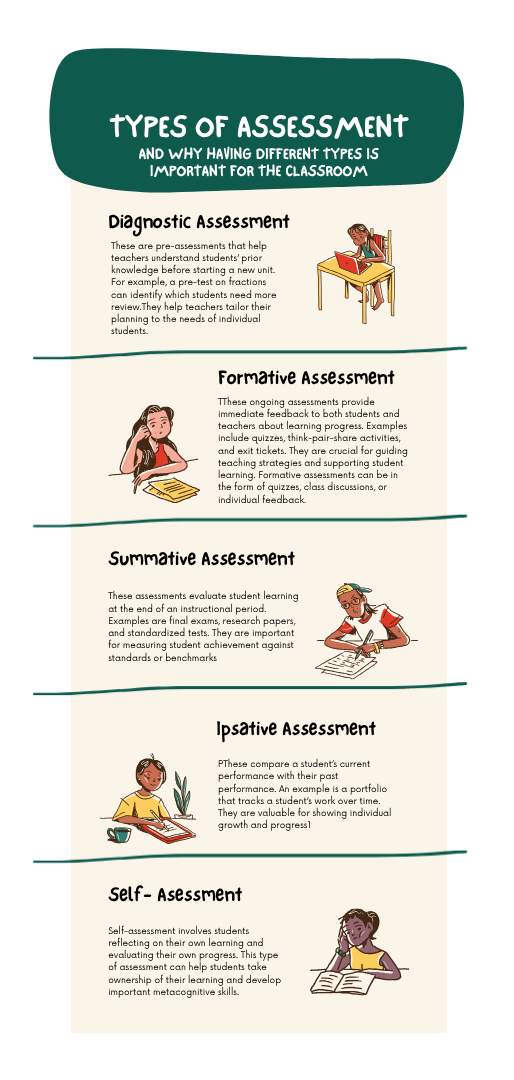
A library of visual job aides and quick-reference guides designed to support faculty and staff at the moment of need. Each aid distills a complex process into a clean, scannable one-pager or checklist, engineered so the most critical step is findable in under 10 seconds.
Design Rationale
Each job aide was developed in response to a recurring support pattern — a question I answered repeatedly, which signaled a genuine, persistent need. Rather than answering the same question multiple times, I invested the time to create a durable resource that would answer it indefinitely. Extensive user testing informed the visual hierarchy: I tested early drafts with faculty to identify where their eyes went first and restructured layouts until the most important information was consistently found first.
Theory & Pedagogy
Job aides are a performance support tool grounded in the understanding that not all learning needs to happen before performance — some knowledge is best accessed exactly when needed. This aligns with Knowles' problem-centered orientation: adults seek information to solve an immediate problem, not to build a future knowledge base. UDL principles guided the visual design: clear heading hierarchy, sufficient color contrast, and print-friendly formatting ensure the aides are accessible to all users regardless of visual ability or device.
ID Expo Booth Eye Candy
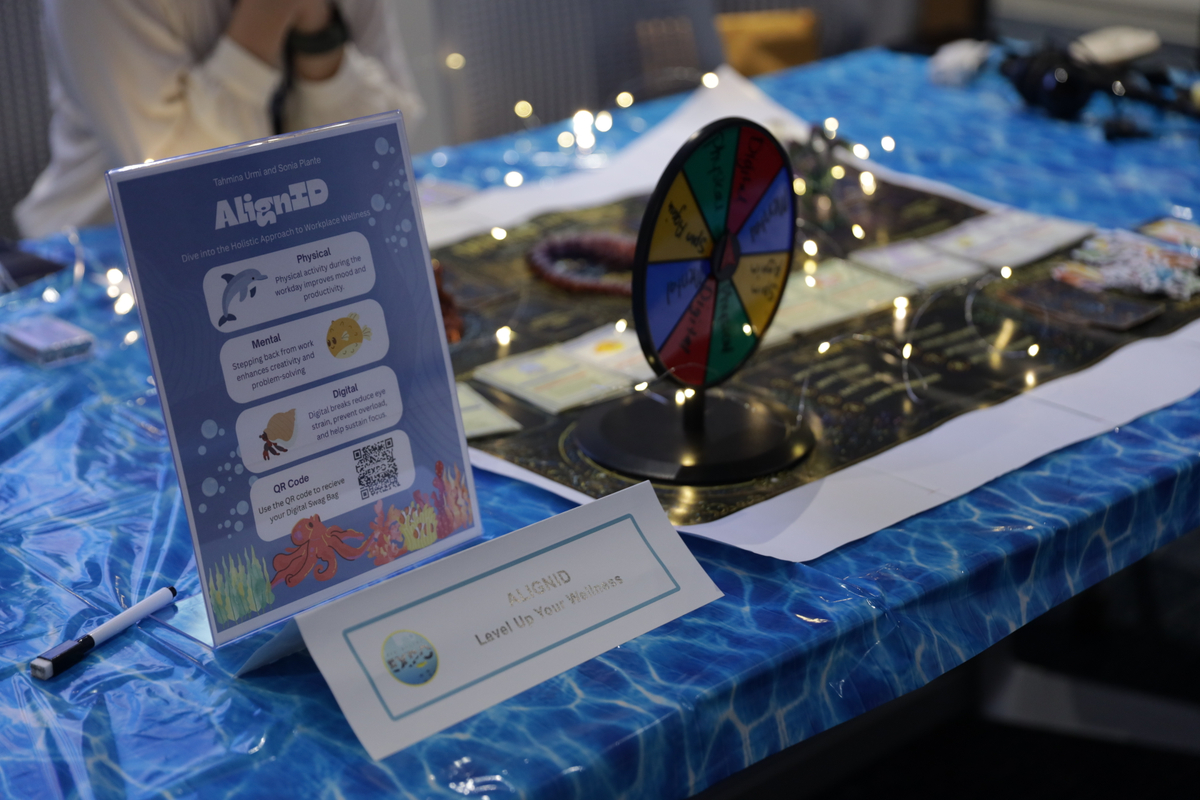
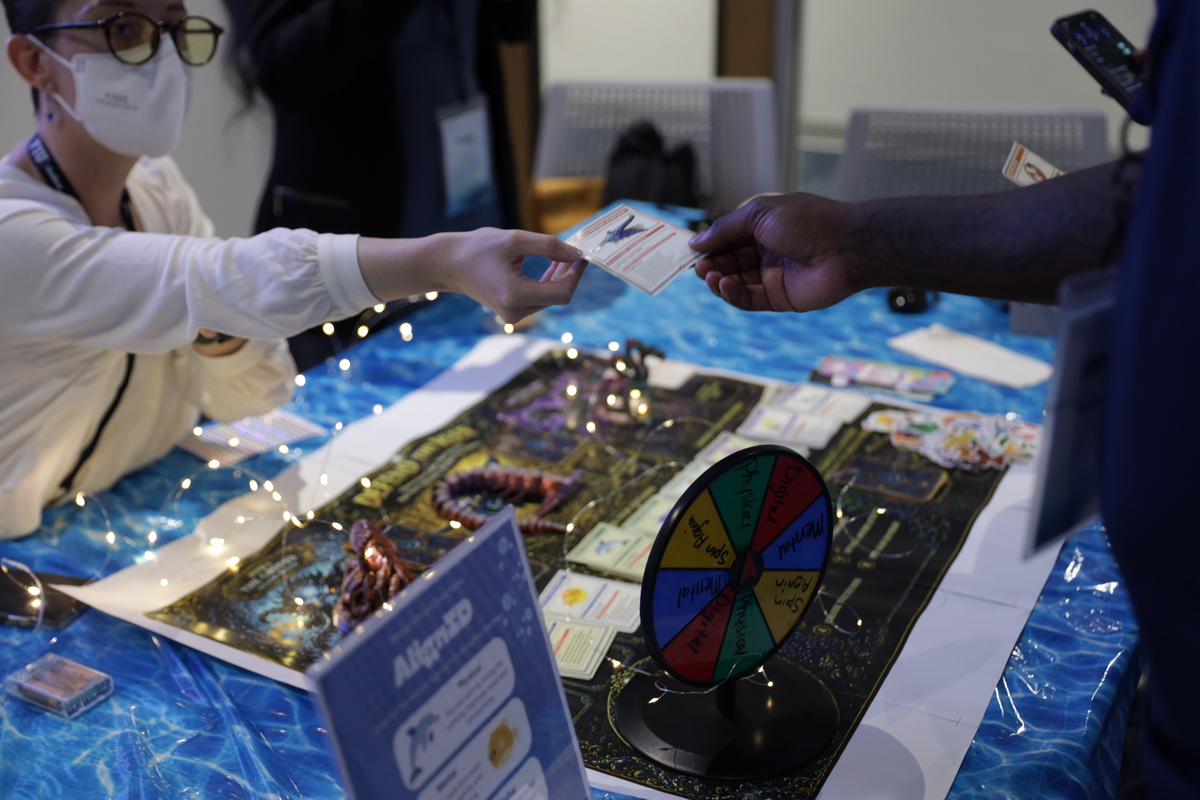
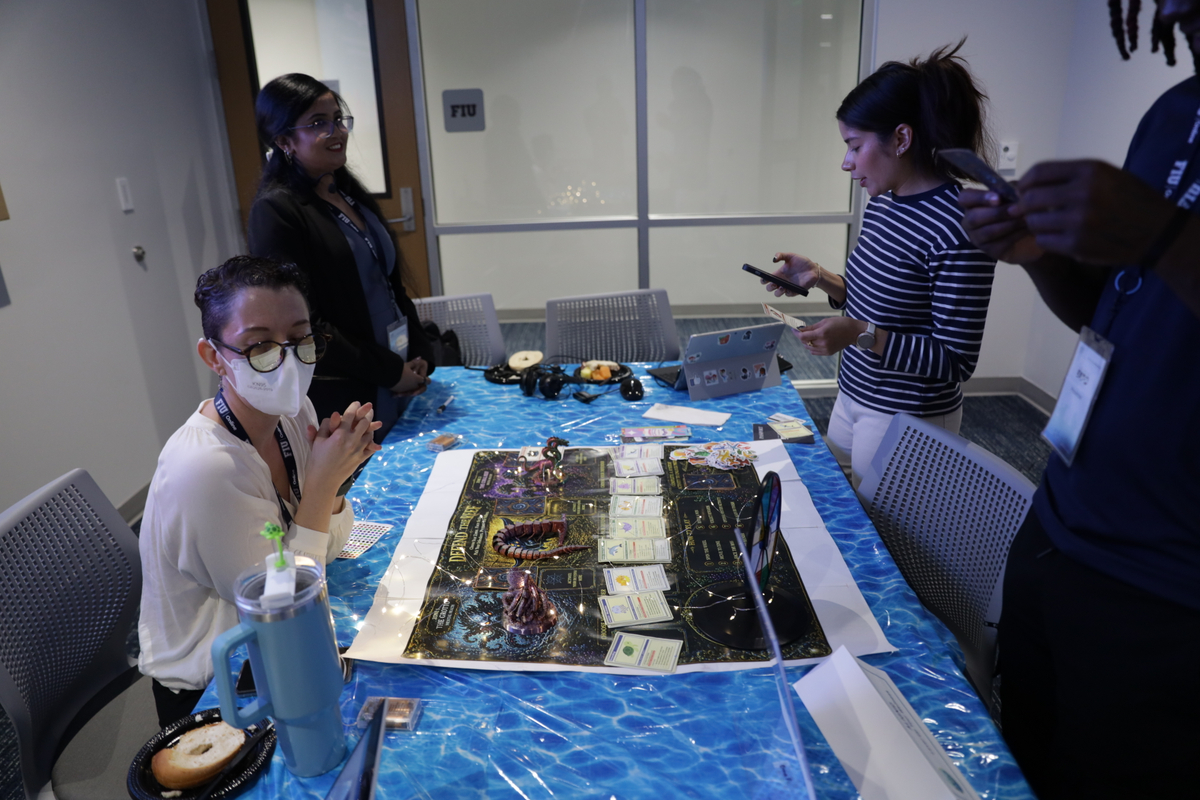
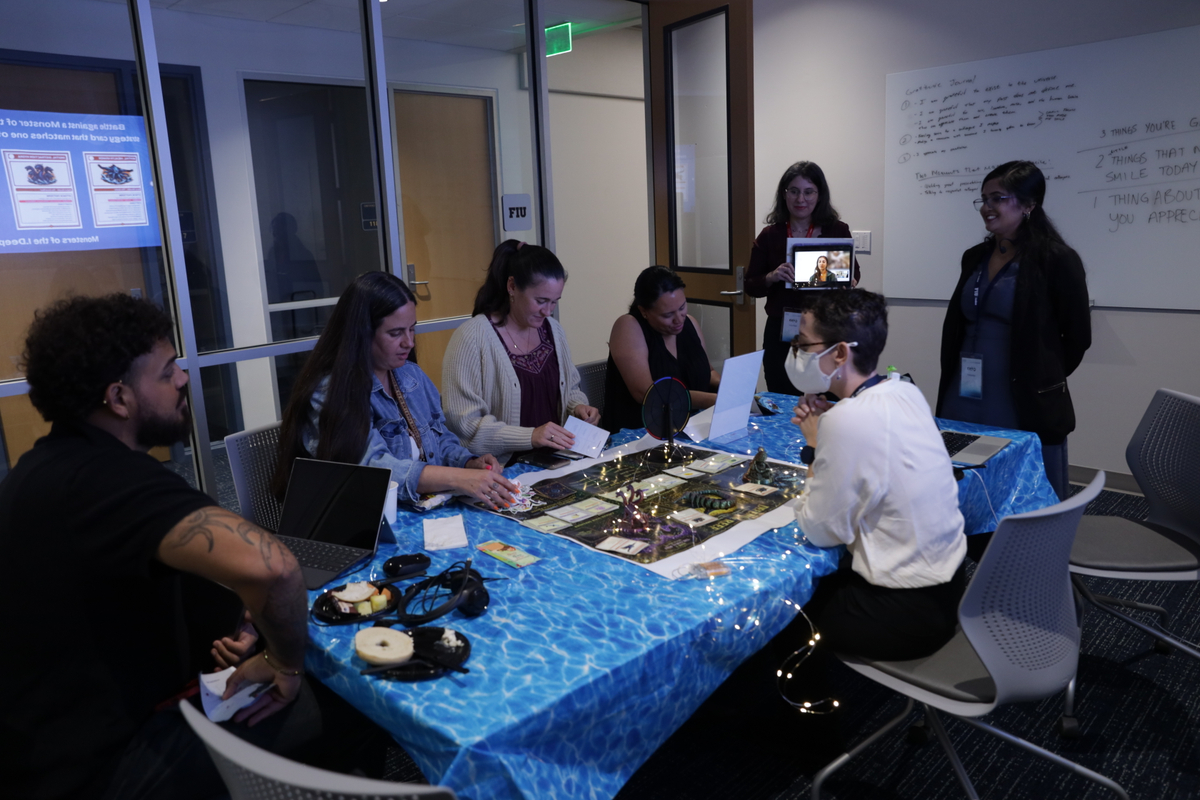
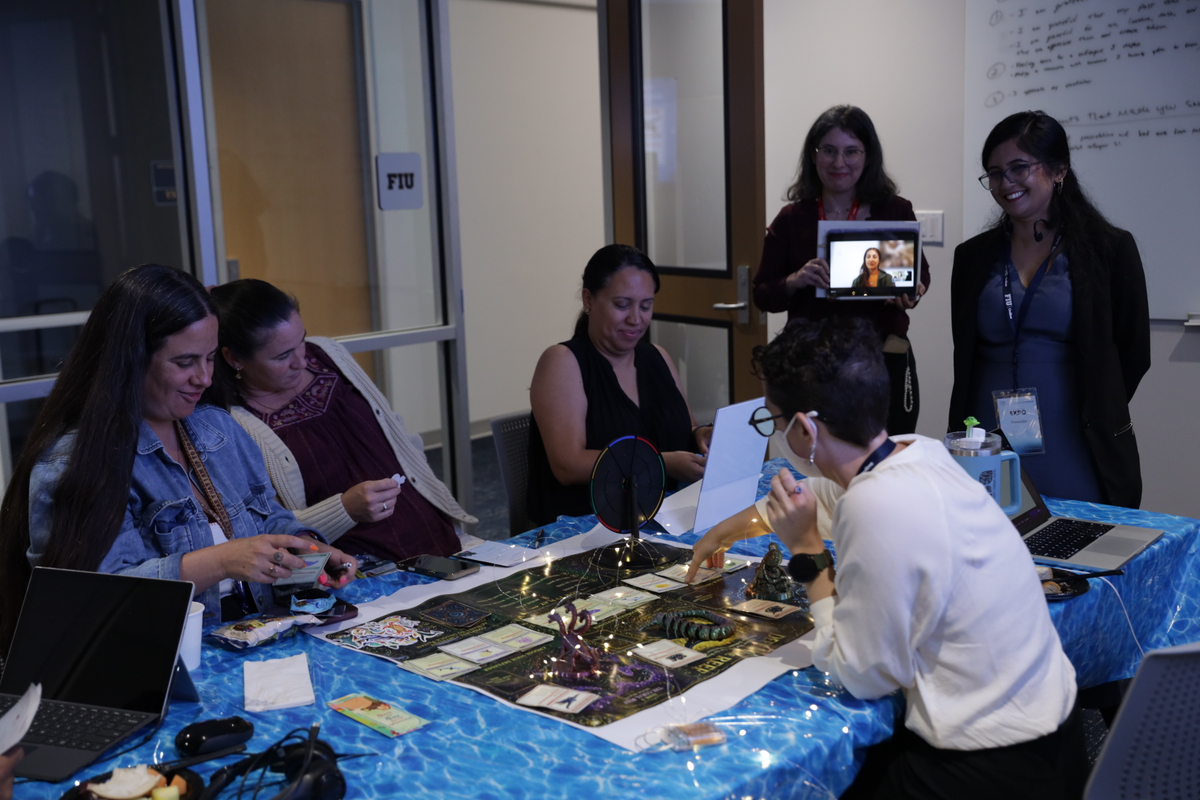
Conceptualized and produced an interactive exhibit booth for the institution's ID Expo — an internal showcase presenting instructional design work to the FIU Online department. The booth was designed not just to display examples, but to engage visitors actively with demonstrations and conversations.
Design Rationale: The Context & Challenge
The university department hosted an Instructional Design Expo themed “Dive into Design: Learning with Depth.” Attendees from various cross-functional branches—including the Learning and Design team, the IT department, and marketing—circulated through themed rooms to absorb actionable Instructional Design insights. My team was assigned to the "Shipwreck" room.
The core challenge of an Expo environment is engagement friction and cognitive fatigue. Attendees move quickly between tables, meaning a traditional passive presentation or a text-dense poster board would fail to compete for attention. As the team leader and concept producer, I needed to design an experiential space that was visually striking, playful yet professional, and capable of teaching a profound design truth in under two minutes: Good design is not just decoration—it helps learners know what matters first.
The Activity: Course Page Rescue
The narrative framework positioned participants as "design divers" rescuing a Canvas course page that had "crashed from too much eye candy."
• The Architecture: I engineered a large 36” x 24” physical Canvas-style baseboard blueprint, meticulously recreating the institutional blue global navigation bar and course menus to mirror a real working environment.
•The Mechanics: I designed a comprehensive set of printed UI cards with rounded corners, subtle dropshadows, and color accents. Attendees interacted with the board by physically moving, removing, or grouping pieces (Course Banners, Welcome Videos, Noise/Distraction chips like "Click Here!") to clean up the hierarchy. The pedagogical goal was to demonstrate that a course page does not require a complete makeover; fixing just one competing element dramatically reduces extraneous cognitive load.
Theory & Pedagogy
The booth design applied Knowles' principle that adults learn best through experience — visitors didn't read about good course design, they interacted with it directly. The consultation area reflected the ADDIE model's Analysis phase: by facilitating brief conversations about faculty needs, the Expo simultaneously served as informal needs assessment for future instructional design partnerships.
Collaboration, Leadership, & Peer Impact
As the team leader, I coordinated our presentation workflows, managed print-ready files, and structured our booth script to guide attendees smoothly from an initial hook to an active reflection. The project illustrated my ability to lead a design committee, synthesize theoretical frameworks, and build engaging professional development tools that elevate our institution's collective design standards.
Photo from the Expo — add image here
ID Expo Booth 2
A second Expo booth with an expanded focus on accessibility and learner-centered design, featuring hands-on activities that allowed visitors to experience accessibility tools firsthand. Built on lessons learned from Booth 1, with intentional design improvements informed by post-event feedback.
Design Rationale
Feedback from Booth 1 revealed that visitors wanted more hands-on interaction and specifically asked about accessibility. I used that feedback directly to redesign the booth's focus — this is the ADDIE model's Evaluation-to-Analysis loop in practice. The accessibility demos (screen reader simulation, contrast checker, keyboard navigation test) were chosen because experiencing inaccessibility firsthand is far more persuasive than reading about it. The goal was to create an "aha moment" that would motivate faculty to prioritize accessibility in their own courses.
Theory & Pedagogy
This booth embodied UDL principles in both content and method: the accessibility demonstrations modeled inclusive design while also being designed to engage visitors through multiple modalities (visual, tactile, conversational). The iterative design from Booth 1 to Booth 2 demonstrates the ADDIE model's evaluation cycle — evidence that I treat my own instructional design work with the same rigor I apply to the courses I support.
Photo from the Expo — add image here
Project gallery
Caption for image one
Caption for image two
Caption for image three
Caption for image three
Caption for image three
HQ / QM Certified Courses
Designed, reviewed, and supported the certification of multiple online courses to High Quality (HQ) and Quality Matters (QM) standards — a rigorous process examining course alignment, accessibility, learner support, assessment design, and instructional materials against nationally recognized benchmarks.
Design Rationale
Pursuing QM certification for courses I support is a deliberate quality assurance strategy, not a bureaucratic requirement. The QM rubric provides a shared, evidence-based language for conversations with faculty about course design — making it easier to advocate for learner-centered changes grounded in nationally recognized standards rather than personal preference. For each course, I conducted a gap analysis against the QM rubric before revision, prioritizing the areas most likely to impact student success and alignment.
Theory & Pedagogy
QM certification work inherently applies the full ADDIE model: each course undergoes analysis (gap review against rubric), design and development (revision of learning objectives, assessments, and materials), and evaluation (formal peer review). Bloom's Taxonomy is central to the process — QM Standard 2 requires that learning objectives be written at measurable cognitive levels, which I worked with faculty to revise and align throughout. UDL principles are embedded in QM Standards 6 and 8, requiring accessible technology and adequate learner support.
Impact & Certified Courses
Courses certified to HQ/QM standards demonstrate measurably stronger alignment between objectives, assessments, and materials — directly supporting student clarity and success.